


Whirlpool
Genuine Whirlpool Terminal Nut W11715949
WPL-W11715949
Availability
Ships within2-4 Business Days
Part Number
WPL-W11715949
Manufacturer
Whirlpool
Compatible Brands:


Pièces de qualité
Facile à installer
Fiable
De longue durée
Frequently Bought Together
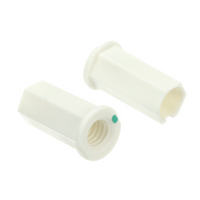

Genuine Whirlpool Terminal Nut | OEM Part Number: W11715949
Whirlpool W11715949 is a terminal nut used as fastening hardware in the application specified by your appliance's parts diagram. Match the original part number and full appliance model before ordering; thread size and tightening requirements must be checked in the model-specific service documentation.
Technical Specifications
| OEM Part Number | W11715949 |
|---|---|
| Manufacturer | Whirlpool |
| Part Type | Terminal nut |
Symptoms Fixed by Replacing W11715949
- Damaged fastening hardware: Replace the original terminal nut if inspection confirms damage and the parts diagram specifies W11715949.
- Missing original nut: Replace missing hardware with the correct model-specified component before using the appliance.
Do not assume a nut replacement will repair damaged terminals or wiring. Have the complete connection inspected if there is evidence of overheating or electrical damage.
Key Product Benefits
- Genuine OEM Whirlpool fastening hardware.
- Manufacturer part number supports accurate identification.
- Terminal nut designation helps match the component to the model-specific parts diagram.
Part Compatibility & Cross-Reference Numbers
OEM part number: W11715949
Compatible brands: Whirlpool, Kenmore, KitchenAid, Roper, Estate, Maytag, Amana, Admiral, Magic Chef, Norge, Jenn-Air.
Brand alone does not establish compatibility. Please verify fitment using your appliance's full model number before purchasing.
Step-by-Step Installation Instructions
Safety: Unplug the appliance or disconnect power at the breaker before servicing. Never work on an energized terminal. Use a qualified technician if terminals or wiring are damaged or if safe access is uncertain.
- Confirm W11715949 in the appliance's model-specific parts diagram.
- Follow the service manual to access the terminal hardware safely.
- Record the original position and order of any connected hardware before removal.
- Inspect the terminal and associated hardware for damage; do not reuse damaged components.
- Install the correct nut following the manufacturer's specified hardware arrangement and torque requirements.
- Reassemble all covers and guards before restoring power and checking operation as directed by the service manual.
Ships within2-4 Business Days
- Safety: Unplug the appliance or disconnect power at the breaker. Never work on an energized terminal. Use a qualified technician if terminals or wiring are damaged or safe access is uncertain.
- Confirm W11715949 in the model-specific parts diagram.
- Access the terminal hardware according to the service manual.
- Record the original hardware position and order.
- Inspect the terminal and associated hardware; do not reuse damaged components.
- Install the nut using the manufacturer's specified arrangement and torque requirements.
- Reassemble covers and guards before restoring power and checking operation.
W11715949
- Damaged original terminal nut.
- Missing original terminal nut.
- Confirm W11715949 fitment and inspect the complete connection before replacement.
Not sure if this part fits your model? Our appliance experts can confirm compatibility — contact us.
Besoin d'aide ?
Nos experts en électroménager sont là pour vous aider à trouver la pièce adaptée.
Contact SupportOEM & Generic Parts
OEM Parts Authenticity Guaranteed.