


GE
GE WD21X31909 Dishwasher Configured User Interface Control Board - Part
GEN-WD21X31909
Availability
Ships within2-4 Business Days
Part Number
GEN-WD21X31909
Manufacturer
GE
Compatible Brands:

 GE ProfileCafe
Piezas de calidad
Fácil de instalar
Fiable
De larga duración
Frequently Bought Together
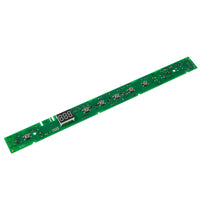





GE Dishwasher Configured User Interface Board - Part WD21X31909
Restore full control of your GE dishwasher with this genuine OEM configured user interface board. Part number WD21X31909 is the electronic control board behind the front panel that processes button inputs, displays cycle selections, and communicates with the main control board to run wash programs. When this board fails, buttons may become unresponsive, the display may go blank or show incorrect information, or the dishwasher may not start at all.
Key Features
- Genuine GE OEM configured user interface control board
- Manages all front-panel button inputs and display functions
- Pre-configured for specific GE dishwasher models
- Direct plug-in replacement with no reprogramming required
- Restores full cycle selection and display functionality
Common Symptoms This Part Fixes
- Dishwasher buttons unresponsive or intermittent
- Display is blank, flickering, or showing errors
- Dishwasher will not start when cycle is selected
- Incorrect cycle or status information on the display
- Control panel lights are dim or not illuminating
Installation Tips
Disconnect the dishwasher from the power supply at the circuit breaker. Open the dishwasher door and remove the screws along the inner edge of the door panel. Carefully separate the outer door panel from the inner panel to access the user interface board. Disconnect the ribbon cables and wire harnesses from the old board, noting their positions. Install the new board, reconnect all cables, and reassemble the door panel.
WARNING: This product can expose you to chemicals which are known to the State of California to cause cancer and birth defects or other reproductive harm. For more information go to www.P65Warnings.ca.gov.
Ships within2-4 Business Days
- Disconnect power at circuit breaker
- Open dishwasher door
- Remove screws along inner door panel edge
- Separate outer door panel from inner panel
- Disconnect ribbon cables and wire harnesses
- Remove old UI board
- Install new board and reconnect all cables
- Reassemble door panel and restore power
WD21X31909
- Buttons unresponsive
- Display blank or flickering
- Dishwasher will not start
- Incorrect cycle display
- Control panel lights dim
Compatible models
GE GDT Series dishwashers GE DDT Series dishwashers GE PDT Series dishwashers
¿Necesitas ayuda?
Nuestros expertos en electrodomésticos están aquí para ayudarle a encontrar la pieza adecuada.
Contact SupportOEM & Generic Parts
OEM Parts Authenticity Guaranteed.