
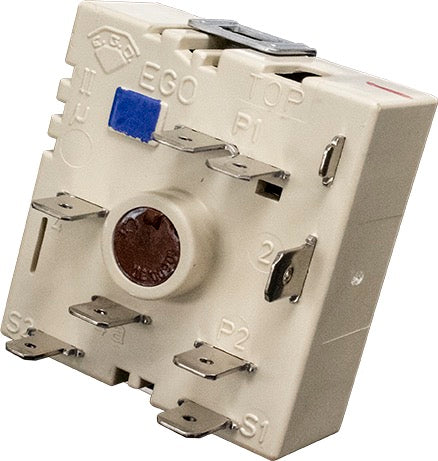
ERP
ERP ERES1008A Range Infinite Switch | Replaces ES1008A, DG44-01008A
ERES1008A
Availability
Ships within2-4 Business Days
Part Number
ERES1008A
Manufacturer
ERP
Compatible Brands:

Quality Parts
Easy to Install
Reliable
Long-Lasting
Frequently Bought Together

Share
Share this product
Make an Offer
Think this price can be better?
Range Infinite Switch For: Samsung ES1008A, DG44-01008A
Safety first: Unplug the range or turn off its breaker before servicing. Electrical connections should be handled by a qualified technician.
Restore precise surface-burner heat control with this ERP replacement infinite switch for compatible Samsung ranges. A failed infinite switch can leave a burner dead, stuck on high, or unable to hold a low simmer. This switch is rated 240V, 15A (1250W). Verify the complete range model, original part number, and terminal layout before ordering.
Product Details
- SKU: ERES1008A
- Country of origin: China
- Voltage: 240V
- Amperage: 15A
- Power: 1250W
Compatible Part Numbers
- ES1008A
- DG44-01008A
Key Features
- Direct replacement: Replaces the listed Samsung infinite switch part numbers.
- Burner control: Regulates the heat level of a surface element.
- Matched ratings: 240V, 15A (1250W).
- Installation check: Match the terminal layout and ratings with the original switch before wiring.
Fixes These Symptoms
- Surface burner will not heat at all
- Burner only heats on high or will not turn down
- Burner stays hot regardless of the knob setting
- Surface element heats erratically or will not hold a simmer
Compatible Brands
Samsung
Compatible Models
Fits various models. Please verify compatibility with us before ordering
Installation Instructions
- Disconnect electrical power before servicing the range.
- Confirm the complete range model, original part number, and terminal arrangement.
- Remove the control knob and panel to access the switch, and label the wires before disconnecting them.
- Transfer the wires to the matching terminals on the new switch and secure it in place.
- Reassemble the range and test the burner at each heat setting before returning it to service.
Use a qualified appliance technician if the wiring, terminal layout, or installation procedure is uncertain.
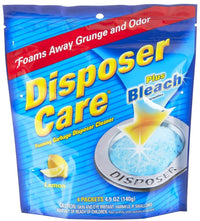
For appliance cleaning products, visit affresh appliance cleaning products.
Safety Disclosure
Prop 65 Warning: Cancer and Reproductive Harm – www.P65Warnings.ca.gov
Ships within2-4 Business Days
- Installation guidance for ES1008A. This is a preparation checklist, not a model-specific service procedure.
- Confirm the appliance model, original part number, dimensions, connector arrangement and electrical ratings before installation. Obtain the manufacturer's instructions for that exact model.
- Before service, disconnect electrical power. Isolate water or gas supplies if the repair affects them. Electrical connections and any stored-energy components should be handled by a qualified technician.
- Follow the exact model instructions for access, removal, mounting and connections. Do not force a similar-looking part to fit, improvise wiring, or bypass a fuse, thermostat, interlock or other safety device.
- Reinstall guards and panels, and complete the manufacturer-specified safety and operating checks before returning the appliance to service.
- If the exact installation procedure or compatibility is uncertain, stop and contact the appliance manufacturer or a qualified service technician.
- Product/cross-reference information (not a service manual): https://supco.com/web/supco_live/products/ES1008A.html
ES1008A DG44-01008A
- Surface burner will not heat at all
- Burner only heats on high or will not turn down
- Burner stays hot regardless of the knob setting
- Surface element heats erratically or will not hold a simmer
Not sure if this part fits your model? Our appliance experts can confirm compatibility — contact us.
OEM & Generic Parts
OEM Parts Authenticity Guaranteed.